It's been a while since my last post but today I'm back with a new post to clarify how certificate autoenrollment works in a Windows environment. To be more precise, what triggers this process and how does it work when you're using a client offline? As you know, the certificate autoenrollment feature is very handy to automatically request and renew both user and machine certificates for various reasons so sit back and read on.
Wednesday, April 29, 2015

Monday, October 14, 2013
Fuzzy Windows 8.1
I just upgraded to Windows 8.1 and noticed that all of my applications got fuzzy. Apparently, Windows has discovered that my display has a "very high resolution" (1920x1080) and tries to make everything better by scaling the fonts to a point where they get fuzzy. This was driving me mad as I thought my contact lenses were the cause. What resolved it for me was to disable scaling for each application.

Wednesday, October 9, 2013
How to configure EAP-TLS
Far too many times have I come across a wireless environment where it has been said that the authentication method in use is none other than EAP-TLS. This is good as EAP-TLS is not only the most secure method but also the easiest method from a user perspective, a rare combination in this day and age. Still, when looking over the configuration, it appears that most environments are using PEAP-MSCHAP v2 which isn't EAP-TLS at all. How can this be? Perhaps because PEAP-MSCHAP v2 is default. So, how does one configure EAP-TLS, then?
Friday, September 13, 2013
Error moving mailbox from Office 365
In a Hybrid Exchange environment (On-Premises and Office 365) one might stumble upon problems moving mailboxes from Office 365 to On-Premises, known as offboarding with the following error message.
Cannot find a recipient that has mailbox GUID <many numbers>The reason for this error is that the mailbox has been created in Office 365 and lacks the proper attributes in the On-Premises environment. So, connect to Office 365 using PowerShell and run the following command.
Get-Mailbox john.doe@domain | fl ExchangeGuidNext, verify that the remote mailbox On-Premises is lacking the proper attribute.
Get-RemoteMailbox john.doe@domain | fl ExchangeGuidYou'll notice that the On-Premises attribute are nothing but zeroes. Copy and paste the attribute from Office 365 on to you On-Premisies environment using the following command.
Get-RemoteMailbox john.doe@domain | Set-RemoteMailbox -ExchangeGuid <copied from Office 365>That's is. Moving the mailbox from Office 365 to you On-Premiese environment should now work just fine. Or will it? If your On-Premises environment is published by Forefront Threat Management Gateway (TMG) 2010 you might also stumble upon the following error in your move request logs.
Relinquishing job because the mailbox is lockedOr the following status of the request.
StalledDueToMailboxLockThis might by caused by server affinity of the published web farm or it could be as simple as flooding. If you're certain that affinity is working properly you'll have to do some work on your TMG server to fix the flooding issue. Check out the below link for detailed instructions of what to do.
http://support.microsoft.com/kb/2654376/en-us
Friday, June 28, 2013
Installation of Remote Desktop Web Access failed
If, for reasons unknown to me you stumble upon problems installing Remote Desktop Web Access on Windows Server 2012 in the shape of Error 0x800f0922, the following solution might just be your knight in shining armor. Firstly, locate any certificate bound to a site that doesn't show up in IIS with the following command...
netsh http show sslcertIf anything shows up, delete it with the following command for IPv4...
netsh http delete sslcert ipport=0.0.0.0:443And for IPv6, the following...
netsh http delete sslcert ipport=[::]:443That's it for now. Your Remote Desktop Web Access role should now install just fine.
Wednesday, May 15, 2013
Changes in Exchange 2013
There are many changes in Exchange 2013. Some of them are major changes but most are minor. However, some changes aren't mentioned anywhere. A couple of days ago, I noticed a few changes that really doesn't make any sense at all. I was attempting to transition an Exchange 2003 environment to 2013. Granted, this transition isn't supported and indeed not possible in a normal sense. Still, when transitioning from one Active Directory to another, this doesn't matter as we'll be using PST-files to copy mail content.
Using the trusted, old ExMerge tool, I began extracting all mailboxes below 2GB. After copying the files to the Exchange 2013 server, I then ran the command to import the PST-files to the appropriate mailboxes. Lucky for me, I decided to start with just one mailbox and see how it went. The new mailbox was of course riddled with gibberish causing much distress to the user in question. After some research, it appears that Exchange 2013 as opposed to its predecessors cannot handle PST-files in Ansi format. A rather strange feature to remove in my opinion.
Well, it doesn't end there. Once I was able to import the PST-files after converting them to Unicode, it would appear that the localized names of the folders have been changed. For instance, instead of just using the old name "Sent", this has now been changed to "Sent objects". What was wrong with the old folder names that have been used since... Well, since forever.
Still, it was worth it in the end as Exchange 2013 is just so much better than 2003.
Using the trusted, old ExMerge tool, I began extracting all mailboxes below 2GB. After copying the files to the Exchange 2013 server, I then ran the command to import the PST-files to the appropriate mailboxes. Lucky for me, I decided to start with just one mailbox and see how it went. The new mailbox was of course riddled with gibberish causing much distress to the user in question. After some research, it appears that Exchange 2013 as opposed to its predecessors cannot handle PST-files in Ansi format. A rather strange feature to remove in my opinion.
Well, it doesn't end there. Once I was able to import the PST-files after converting them to Unicode, it would appear that the localized names of the folders have been changed. For instance, instead of just using the old name "Sent", this has now been changed to "Sent objects". What was wrong with the old folder names that have been used since... Well, since forever.
Still, it was worth it in the end as Exchange 2013 is just so much better than 2003.
Monday, October 15, 2012
2013 went RTM
A couple of days ago, both Exchange and Lync 2013 went RTM. What kind of impact this will have on the industry is yet to be unfolded. What we do know is that Microsoft is pushing towards the cloud with a closer integration and a seemingly seamless experience (pun intended). In my book, the biggest news will have to be the offline feature of Outlook Web App in Exchange 2013 which just turns the table upside-down.


Oh, there's Sharepoint and Office too but I'll leave that for others to mention...


Oh, there's Sharepoint and Office too but I'll leave that for others to mention...
Thursday, October 4, 2012
Windows Server 2012 Launch
Just came back from the Windows Server 2012 Launch at a packed Rival in Stockholm. Lots of interesting topics were covered and indeed a few surprises too. Overall, a well organized event by the people at TrueSec. One of the surprises was the fact that Hyper-V now have the ability to allow virtual machines to use hardware accelerated SSL offloading. Another interesting point was the power of the new PowerShell 3.0 (pun intended) which seem to open up endless opportunities with new workflow feature. Great stuff!
Wednesday, September 26, 2012
Direct Access Teredo Ping
Just noticed today that when a Direct Access client connected with Teredo is attempting to make contact with a host on the inside, it will first send an ICMP Echo request (i.e. Ping) to the host. If this fails, it will not be able to establish a connection. This could be relevant in complex environments with firewalls protecting various zones, such as the DMZ. Good to know...
Thursday, August 23, 2012
Microsoft extreme makeover
Yes, that's right. Microsoft has indeed decided to throw away the old logo and replace it with a new one. Or is it really a new logo? Does it look any better? Will it change life as we know it?


Thursday, August 2, 2012
Windows Server 2012 availability
I missed that the Windows Server Blog also informed us that Windows Server 2012 is complete (RTM) and will be available within the next couple of weeks. One could assume that both the client and server version will be available on technet the very same day. And there was much rejoicing!


Wednesday, August 1, 2012
Windows 8 availability
Fresh information from Blogging Windows tells us that Windows 8 will be available in a couple of weeks. MSDN and Technet subscribers will be first in line followed by SA customers and partners the day after. Consumers will have to wait until the last week in October. This is excellent news as I'm about to lay my paws on a new laptop which indeed will be blessed with Windows 8. I'll take that with Hyper-V, thank you!


No official word about Server 2012, though. What's up with that?
Thursday, July 26, 2012
A brief look at Exchange 2013
I've managed to get my hands on a proper lab environment to install the preview of Exchange 2013. It is still limited so unfortunately both roles will have to installed on the same server but that's no problem since this will never be a production environment.
The first noticeable change is the lack of the Exchange Management Console (EMC). The only tools available is the Exchange Management Shell (EMS) and the Exchange Toolbox.
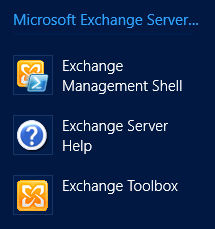
The first noticeable change is the lack of the Exchange Management Console (EMC). The only tools available is the Exchange Management Shell (EMS) and the Exchange Toolbox.
Wednesday, July 25, 2012
Exchange 2013 installation preview
A point of interest concerning the new version of Exchange is the change to the installation process. One of these changes is the role selection screen. Only two roles are up for grabs, the Mailbox and the Client Access role. This might seem like the old Frontend and Backend scenario but digging deeper in the documentation around these roles reveals that this is not the whole truth. The Mailbox role is more or less all previous roles from Exchange 2010 combined and the new Client Access role handles authentication, redirection and proxy requests.




The next change of interest is the option to include malware protection. This adds an extra layer of security which might come as a welcomed feature to most of us.

Not much else has changed apart from the visual experience but I couldn't help but notice the small but apparent logo in bottom left of the installation window which indicates a closer relationship with the Office team at Microsoft.

One should also note that Windows Server 2012 with Exchange Server 2013 demands more resources than previous versions. This is true in the current build but might change when the products goes gold. Still, don't expect these machines to start with anything less than 4GB of memory for each server and plenty of IOPS to spare in your storage solution. My lab consisting of a laptop with 6GB of memory and a single 5400 rpm disk simply couldn't hack it but your mileage may vary.
Monday, July 23, 2012
Invalid canary in cookie
Well, no angry birds but it appears that there are one or two invalid canaries lurking in Exchange 2010. One might think that a stork could be useful but apparently a canary is sufficient for this particular purpose. Go figure...

Note that this "feature" is related to SCOM and is no longer present in Service Pack 2. Some of us will miss the canaries...

Note that this "feature" is related to SCOM and is no longer present in Service Pack 2. Some of us will miss the canaries...
Thursday, June 28, 2012
No habla MAPI
It has been brought to my attention that Outlook 2011 for Mac doesn't speak MAPI. I noticed an extreme growth of IIS logs on a Client Access Server and further inspection pointed towards a single Outlook 2011 for Mac user. What appeared to be a DDOS attack was in fact normal Outlook 2011 EWS usage. If this is the result of a single user, one can only imagine the size of the IIS logs when thousands of Outlook 2011 clients are connecting. The horror...
Monday, June 4, 2012
Delegated mail stuck in outbox
There seem to be a problem with Outlook 2010 regarding the option to send as a delegated mailbox when running in online mode. Apparently, the mail is sent but it seem to be stuck in the outbox folder of the main mailbox. This only happens in the following scenario.
- Outlook is running in online mode
- A mail is sent from a delegated mailbox
- The registry tweak to move sent mail to the appropriate sent items folder is activated
According to a certain Fiona Liao, this is a known issue within Microsoft and will not be fixed until Outlook 2012. Also, the same problem seem to be present in Outlook 2011 for Mac OS X.
Friday, May 25, 2012
Problems with Exchange 2010 updates
In a recent post, I mentioned a problem with an endpoint mapper (RPC) after the installation of Service Pack 2 for Exchange 2010. It has come to my attention that the reason for this problem is due to a problem with the initial installation. The problem happened again in the same Exchange environment during a Rollup 2 installation which lead me to investigate the Exchange Setup logs further. In the file UpdateCAS.log the following entry was logged.

The line reads "Error updating OWA/ECP: The term 'Get-ExchangeServer' is not..." which indicated a problem with the Exchange Management Shell (PowerShell) commands. After browsing around the configuration I noticed that some entries were missing from the registry compared to another Exchange server.

A quick fix for this problem was simply to export the PowerShellSnapIns key from a working Exchange server and import the difference to the faulty one. The question to why these keys are missing in the first place still remains unanswered. However, we're one step closer to the truth.

The line reads "Error updating OWA/ECP: The term 'Get-ExchangeServer' is not..." which indicated a problem with the Exchange Management Shell (PowerShell) commands. After browsing around the configuration I noticed that some entries were missing from the registry compared to another Exchange server.

A quick fix for this problem was simply to export the PowerShellSnapIns key from a working Exchange server and import the difference to the faulty one. The question to why these keys are missing in the first place still remains unanswered. However, we're one step closer to the truth.
Monday, May 21, 2012
Excessive login time in Windows 7
I recently stumbled upon a client where the login time could be classified as not of this world. For me, any login time exceeding 10 seconds is to be considered too long. I'm not talking about boot-up time but the time it takes for the desktop to appear after username and password has been entered. After the usual investigation relating to the network, DNS and Group Policies, the problem was found in the event logs.

Say hello to nearly 4 minutes of Folder Redirection processing. As it turned out, the user had made its entire home folder available offline which caused these dramatic effects to the login time as the number of files exceeded too many to be mentioned here. The solution was simply to not make the files available offline and clear the temporary cache which decreased the login time to a respectable 5 seconds.

Say hello to nearly 4 minutes of Folder Redirection processing. As it turned out, the user had made its entire home folder available offline which caused these dramatic effects to the login time as the number of files exceeded too many to be mentioned here. The solution was simply to not make the files available offline and clear the temporary cache which decreased the login time to a respectable 5 seconds.
Friday, May 18, 2012
Certificate request from an OS X Lion client
It appears that Apple has made it quite convenient to request a certificate from a Windows Certificate Authority using the AD Certificate Payload Plugin. There are a number of issues that needs to be addressed however but in the whole it seems to work fine. This method actually makes it possible for the OS X client to acquire a computer certificate used for 802.1x authentication in a very slick procedure without the usual hands-on intervention by a network technician. My next quest is to develop a similar method for the not so domain-joined devices known as iPads/iPhones. I'm leaning towards a solution involving the old NDES/SCEP service to bring clarity and justice for all.
Subscribe to:
Posts (Atom)